
The AI revolution isn’t just about chatting with bots; it’s about building tools that work for you. One of the most lucrative “side hustles” emerging in 2026 is creating Free AI Voice Agents for businesses. Imagine a virtual receptionist that works 24/7, never sleeps, and captures every lead—built entirely for free using Google’s ecosystem.
If you have been looking for a low-code way to enter the tech market, this is it. You don’t need a computer science degree. You just need the right tools and a clear roadmap.
In this guide, we will break down exactly how to build, test, and sell Free AI Voice Agents using the latest Gemini models.
Why Build AI Voice Agents?
Before we dive into the “how,” let’s talk about the “why.” Small businesses—dentists, salons, real estate agents—lose money every time they miss a phone call. An AI voice agent acts as a perfect receptionist.
- Zero Cost Setup: Using Google’s developer tier, you can start without credit cards.
- High Value: Businesses are willing to pay monthly retainers for automated lead capture.
- Scalability: Once you build one agent, you can copy-paste the logic for ten other clients.
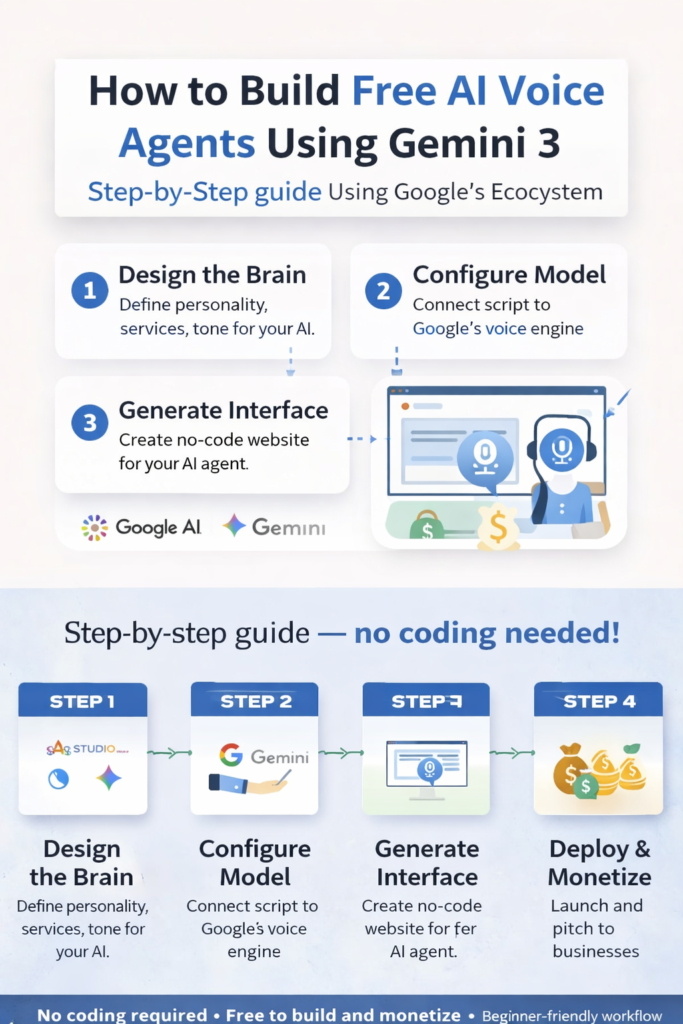
Here is your 4-step blueprint to mastery.
Step 1: Design the “Brain” with Gemini
The first step in building Free AI Voice Agents is defining the personality. You are not writing code here; you are writing a character description.
The Tool: Google Gemini
The Method: Treat Gemini like a senior developer. You need to give it a specific goal. Open Gemini and use a prompt like this:
“Write a system instruction for an AI voice agent for [Dental Clinic Name]. It should handle appointment bookings, answer FAQs about pricing, and handle objections politely. The tone should be professional, empathetic, and concise.”
The Output: Gemini will generate a structured script (often in JSON or Markdown format) that defines how the agent behaves. This script is the “brain” of your operation.
Step 2: Configure the Model in Google AI Studio
Now that you have the brain, you need a body. Google AI Studio is the engine room where you connect your script to the actual AI model.
The Tool: Google AI Studio
The Setup:
- Create New: Log in and select “Create New” -> “System Instructions”.
- Paste the Script: Take the text generated in Step 1 and paste it into the “System Instructions” block.
- Test It: This is the magic moment. Use the microphone icon in the sidebar to talk to your agent.
Pro Tip: If the agent sounds too robotic or long-winded, tweak the instructions. Add a line like “Keep responses under 20 words” to make it sound more natural.
Step 3: Generate the Interface (The “No-Code” Method)
To make this usable for a client, they can’t log into your Google account. They need a simple website with a microphone button. You don’t need to know HTML for this—Gemini does.
The Tool: Google Gemini
The Prompt:
“Write the HTML, CSS, and JavaScript code for a modern, mobile-friendly landing page for a [Business Name]. Include a large, centered microphone button that integrates with the Gemini API for voice interaction.”
Refining the Code: Gemini will spit out the raw code. You can ask for revisions: “Make the button blue,” or “Add a space for the business logo.” This step allows you to create a professional-looking “app” without writing a single line of code manually.
Step 4: Deploy & Monetize
Your Free AI Voice Agents are ready. Now, you need to put them online and pitch them to clients.
How to Launch:
- Host for Free: Use platforms like GitHub Pages or Vercel. These services allow you to upload the HTML code Gemini wrote and publish it to a live URL (e.g.,
my-ai-agent.vercel.app) for free. - Secure the API: Ensure your Google API key is set up correctly so the agent functions on the live web.
Monetization Strategy:
- The Pitch: Approach local businesses with a simple hook: “I can set up a 24/7 AI receptionist that captures leads even when you’re closed.”
- The “Free Demo” Angle: Send them a link to a demo agent branded with their name. Hearing their own business name spoken by the AI is a powerful sales tool.
- The Retainer: Charge a setup fee (e.g., $250) and a small monthly maintenance fee.
Summary Checklist
- [ ] Design: Script the persona in Gemini.
- [ ] Configure: Set up the logic in AI Studio.
- [ ] Build: Generate the website code using Gemini.
- [ ] Deploy: Host it for free and start selling.
Building Free AI Voice Agents is one of the most accessible entry points into the AI economy. You provide tangible value—captured leads and saved time—using tools that cost you nothing but time to master.