
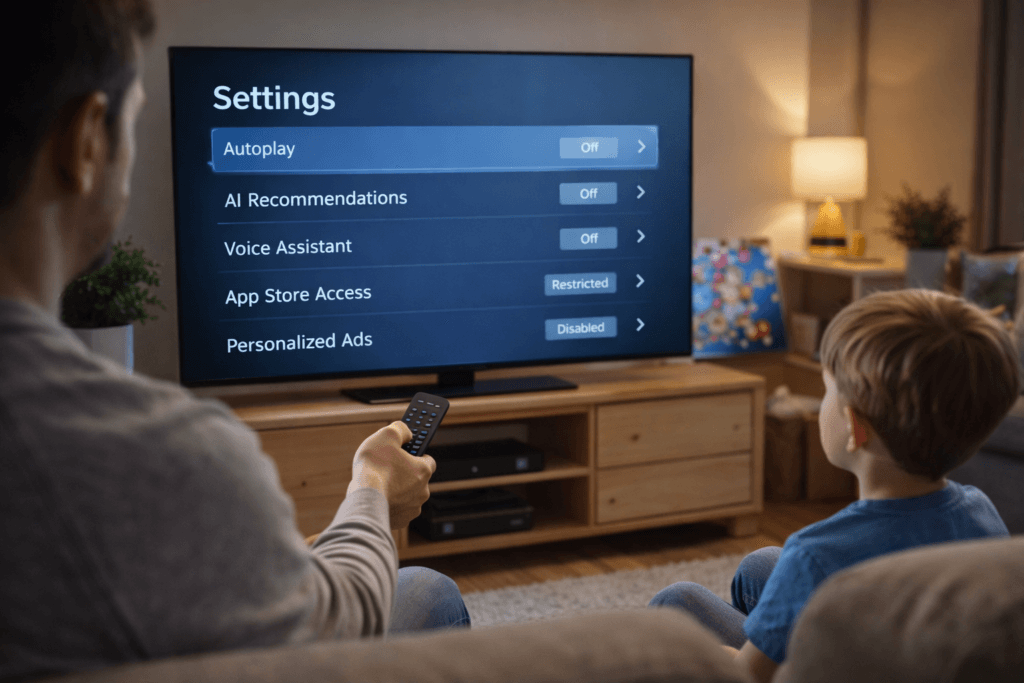

Smart TV settings parents should disable are becoming an important topic in 2026 as more families notice how default television features affect children’s screen habits, privacy, and attention span.
Modern smart TVs are built to maximise engagement, not child wellbeing. By understanding which settings to turn off, parents can regain control and create healthier viewing routines at home.
Why Smart TV Settings Parents Should Disable Matter in 2026
Smart TVs today come with autoplay, AI-powered recommendations, voice assistants, and personalised advertising — all enabled by default.
Parents are increasingly disabling these smart TV settings because:
- Screen time extends without natural stopping points
- Content suggestions prioritise engagement over age suitability
- Viewing behaviour is constantly tracked
This growing awareness builds on concerns already discussed in our guide on turning off smart TV features for kids.
1. Autoplay: A Smart TV Setting Parents Should Disable First
Autoplay removes the natural pause between episodes, encouraging children to keep watching without intention.
Why parents disable autoplay:
- Kids lose track of time
- Emotional resistance when screens are turned off
- Difficulty transitioning to homework or bedtime
Disabling autoplay is one of the simplest smart TV changes parents can make.
2. AI Recommendations Are Smart TV Settings Parents Should Disable
AI recommendations analyse viewing behaviour and push similar content automatically. While convenient, these systems are not designed with children’s mental health in mind.
Parents disable AI recommendations because:
- Content becomes faster-paced and overstimulating
- Thumbnails can be misleading
- Algorithms optimise for watch time, not wellbeing
This issue reflects broader family tech concerns explored in Tech Trends 2026 for Families.
3. Voice Assistants Are Smart TV Settings Parents Should Disable
Always-on microphones raise privacy concerns in homes with children.
Parents choose to disable voice assistants to:
- Reduce unnecessary data collection
- Prevent accidental searches or commands
- Create a calmer home environment
Consumer privacy groups have raised similar concerns about always-on microphones in household devices (https://www.consumerreports.org).
4. App Store Access Is a Smart TV Setting Parents Should Disable
Unrestricted app store access allows children to download apps without approval.
Parents disable this setting to:
- Prevent unwanted downloads
- Avoid ad-heavy or low-quality apps
- Reduce impulsive screen behaviour
This approach mirrors how families manage device access on phones, as discussed in eSIM vs physical SIM security risks.
5. Personalised Ads Are Smart TV Settings Parents Should Disable
Smart TVs track viewing behaviour to deliver targeted ads, even during children’s content.
Parents disable personalised advertising because:
- Children are exposed to targeted messaging
- Viewing habits are continuously monitored
- Ads influence consumption behaviour early
Digital wellbeing organisations recommend reducing targeted advertising exposure for children (https://www.commonsensemedia.org).
Creating Healthier Screen Habits at Home
Disabling smart TV settings doesn’t mean banning screens. Parents are finding success by:
- Selecting content together
- Setting clear viewing schedules
- Encouraging breaks between episodes
These changes allow technology to support family life rather than dominate it.
Why Smart TV Settings Parents Should Disable Are Often Overlooked
Many parents assume that default smart TV settings are designed with families in mind, but most are optimised for engagement rather than wellbeing. Smart TV settings parents should disable are often buried deep inside menus, making them easy to overlook. By reviewing these settings regularly, parents can stay ahead of changes introduced through software updates and ensure screens remain a helpful tool rather than a constant distraction.
Final Thoughts on Smart TV Settings Parents Should Disable
Smart TVs aren’t the problem — default settings are.
In 2026, parents are becoming more intentional about how screens fit into daily routines. By disabling the right smart TV settings, families can create calmer, healthier viewing experiences for children.
Sometimes, the smartest parenting decision starts in the settings menu.
Quick checklist for parents: If you disable autoplay, AI recommendations, voice assistants, app access, and personalised ads — you’re already ahead.